貼上到 Claude Code、Codex、Cursor 或任何支援 Skills 的 Agent 中。
範例提示詞
Use the donut-breakdown skill: title "Traffic sources", parts "Organic: 48 | Social: 30 | Paid: 14 | Email: 8". Ink theme, 9:16.
風格提示詞(Claude Motion 或 Opus 5.5)
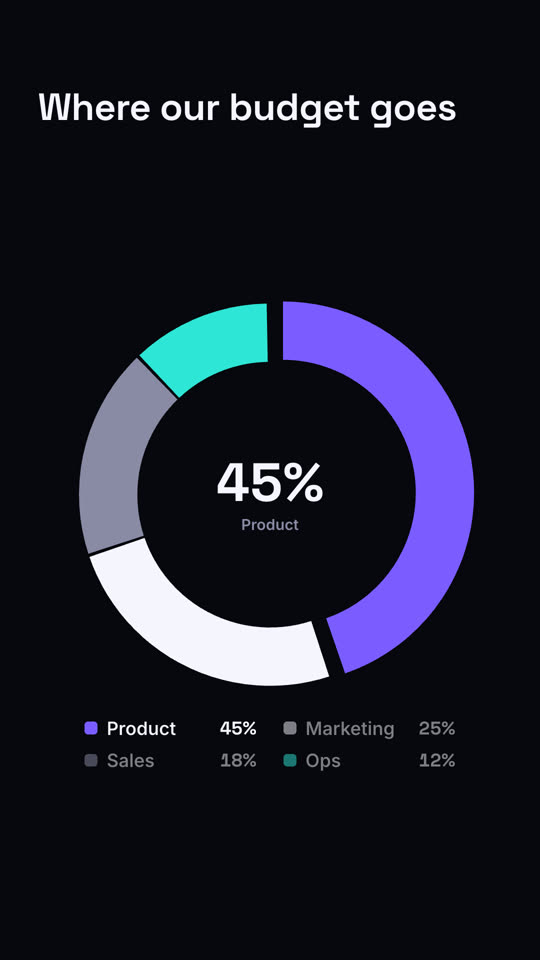
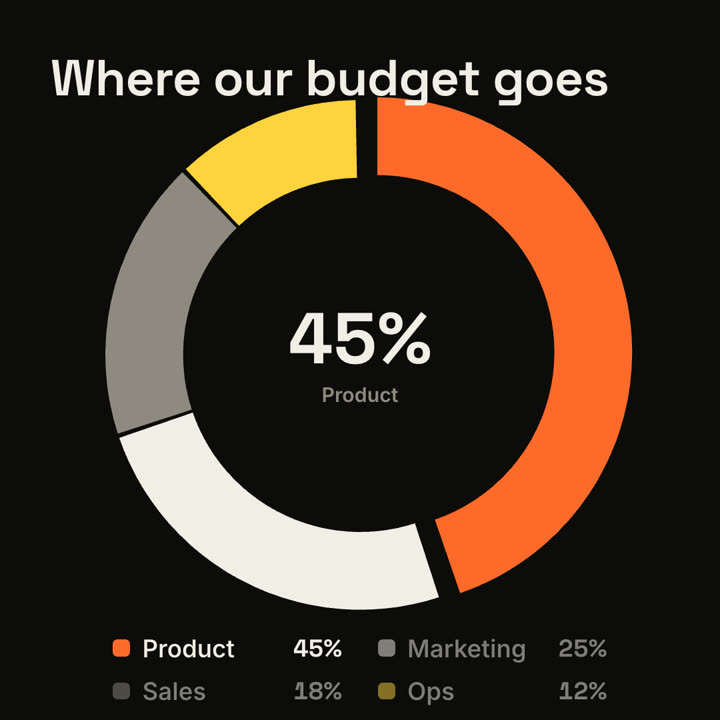
Make a 7-second 16:9 donut chart for [who will watch, e.g. the board], playing [where, e.g. the budget review]. Use only the shares I attach or list below; they must add up to 100%. Off-white background.

The title appears. A thick ring draws segment by segment clockwise (rust orange, black, gray, blue) with a legend fading in beside it. The center counts up to the largest share with its name beneath. End frame: the largest slice pops outward slightly and the other legend items dim.

Title: [e.g. "Where our budget goes"]
Segments: [names and shares] (e.g. Product 45%, Marketing 25%, Sales 18%, Ops 12%)
無需安裝:貼到 Claude Motion(Team 或 Enterprise),或直接傳給 Opus 5.5,就能得到相近的風格。每次執行結果會有差異;用 Skill 則每次結果一致。