貼上到 Claude Code、Codex、Cursor 或任何支援 Skills 的 Agent 中。
範例提示詞
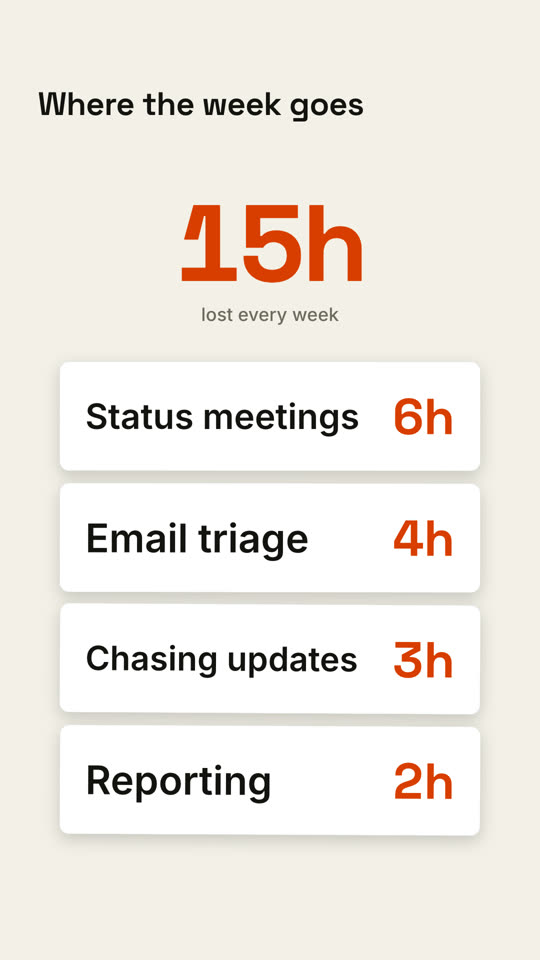
Use the card-stack-counter skill: cards "Design tool: $45 | Video editor: $30 | Stock music: $20 | Captions app: $15", total label "per month, replaced". Paper theme.
風格提示詞(Claude Motion 或 Opus 5.5)
Make a 7-second 16:9 scene for [who will watch, e.g. managers we're selling to], playing [where, e.g. the sales deck]. Use only the items and hours below; the total must equal their sum. Near-black background.

The title sits at the top left. Dark rounded cards drop into a column one at a time, each with an item and its value in orange. Beside them a huge off-white number counts up as each card lands, with a gray caption beneath. End frame: when the last card lands, the total turns orange.

Title: [e.g. "Where the week goes"]
Items and values: [e.g. "Status meetings 6h", "Email triage 4h", "Chasing updates 3h", "Reporting 2h"]
Caption: [e.g. "lost every week"]
無需安裝:貼到 Claude Motion(Team 或 Enterprise),或直接傳給 Opus 5.5,就能得到相近的風格。每次執行結果會有差異;用 Skill 則每次結果一致。